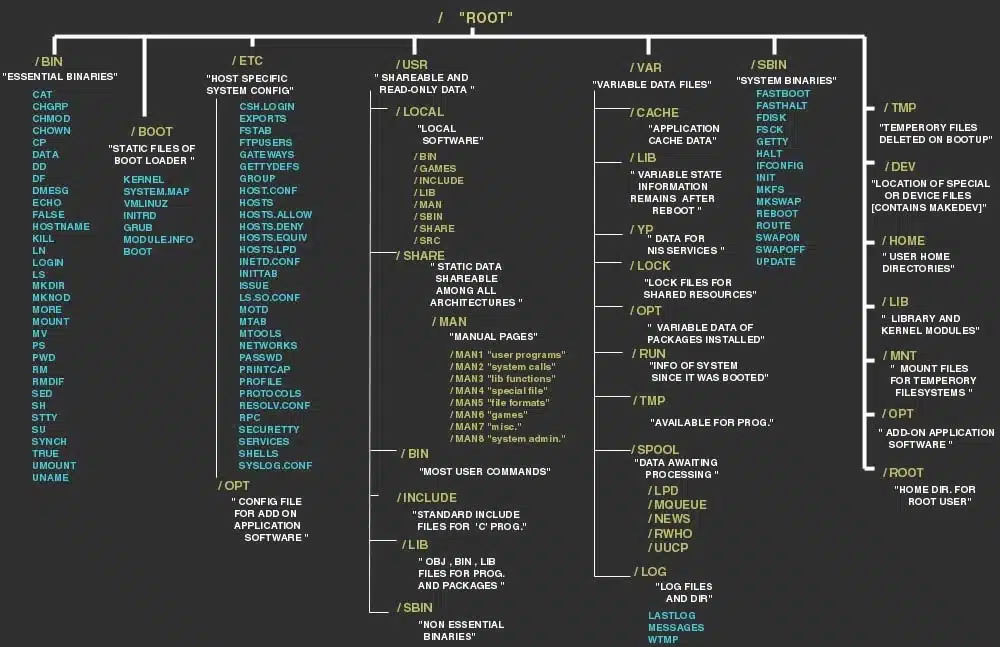
In the previous parts of our Linux 101 series, we introduced Linux and explored its file system. Now, in Part 3, we will focus on managing software packages in Linux. Understanding package management is crucial for installing, updating, and removing software efficiently.
What is a Package Manager?
A package manager is a tool that automates the process of installing, upgrading, configuring, and removing software. Different Linux distributions use different package managers. Here are some of the most common ones:
- APT (Advanced Package Tool) – Used by Debian-based distributions like Ubuntu and Debian.
- DNF/YUM (Dandified Yum) – Used by Fedora, CentOS, and RHEL.
- Pacman – Used by Arch Linux.
- Zypper – Used by openSUSE.
- Snap & Flatpak – Universal package managers that work across different Linux distributions.
Package Management Commands
Below are some essential commands for managing software in different Linux distributions.
APT (Debian & Ubuntu)
- Update package list:
sudo apt update - Upgrade installed packages:
sudo apt upgrade - Install a package:
sudo apt install package-name - Remove a package:
sudo apt remove package-name - Search for a package:
apt search package-name
DNF/YUM (Fedora, CentOS, RHEL)
- Update package list:
sudo dnf check-update - Install a package:
sudo dnf install package-name - Remove a package:
sudo dnf remove package-name - Search for a package:
dnf search package-name
Pacman (Arch Linux)
- Update package database and upgrade system:
sudo pacman -Syu - Install a package:
sudo pacman -S package-name - Remove a package:
sudo pacman -R package-name - Search for a package:
pacman -Ss package-name
Snap and Flatpak (Universal Package Managers)
Snap
- Install Snap:
sudo apt install snapd - Install a Snap package:
sudo snap install package-name - Remove a Snap package:
sudo snap remove package-name
Flatpak
- Install Flatpak:
sudo apt install flatpak - Install a Flatpak package:
flatpak install flathub package-name - Remove a Flatpak package:
flatpak uninstall package-name
Keeping Your System Updated
Keeping software up to date is essential for security and performance. Here are some general guidelines:
- Regularly update your package lists (
apt update,dnf check-update,pacman -Syu). - Upgrade packages (
apt upgrade,dnf upgrade,pacman -Syu). - Remove unnecessary packages (
apt autoremove,dnf autoremove,pacman -Rns).
Conclusion
Managing software packages in Linux is a fundamental skill that will help you keep your system running smoothly. In the next part of this series, we will cover User and Permission Management in Linux.
Stay tuned for Linux 101: Part 4 – User and Permission Management!